Dual-Presenter Teleprompter Workflows: The DP and Director Guide to Multi-Host Studio Sync
Master the dual-presenter teleprompter workflow for two-camera studio shoots, co-anchors, and panel discussions. Learn how to eliminate HDMI splitters, format conversational scripts, and keep talent synchronized without cabling clutter.
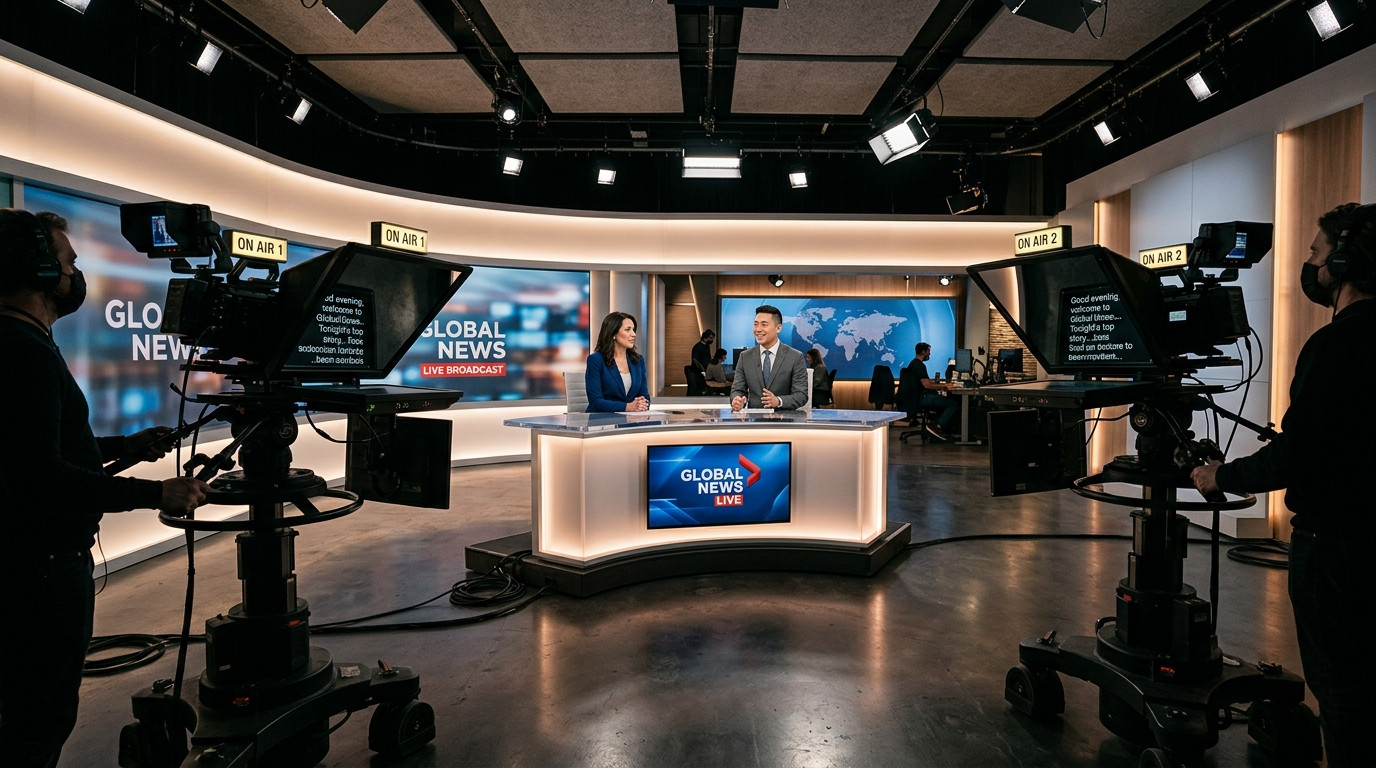
Directing a single presenter on camera is straightforward: you frame the shot, align the beam-splitter glass, and scroll at their conversational pace. The dynamic changes completely when you bring in two hosts, co-anchors, or panel executives. Suddenly you are coordinating two distinct reading speeds, cross-talk transitions, multiple camera eye-lines, and displays that must stay locked on the exact same phrase without drifting.
Traditional broadcast studios historically addressed this with heavy hardware distribution boxes, long HDMI splitters, and bulky floor monitors. For modern commercial video teams, solo producers, and corporate studios, stringing video cables across tripods introduces tripping hazards and signal dropouts. Getting natural takes between two speakers requires deliberate optical positioning, disciplined script formatting, and browser-driven multi-screen synchronization.
The Dual-Presenter Optical Challenge: Eyelines and Rig Geometry
In a standard two-person video interview or co-anchor setup, you typically run two separate cameras: Camera A dedicated to Host 1, and Camera B dedicated to Host 2, with an optional wide master shot in the center. When both presenters read from teleprompter rigs, their gaze must track straight through the beam-splitter glass of their assigned camera rather than drifting across the room.
If you attempt to use a single large off-axis monitor placed between the two cameras, both hosts will appear cross-eyed or disengaged on their tight close-ups. Each camera requires its own dedicated beam-splitter rig mounted directly over the lens. When Host 1 speaks, they look directly down the barrel of Camera A. When Host 2 responds, they address Camera B. The crucial moment happens during conversational handoffs: both speakers must track the script in real time so the listening partner knows precisely when their cue arrives without glancing down at paper notes.
Ditching HDMI Distribution Amplifiers for Browser-Based Clock Sync
Running video splitters and dual HDMI tether cables to two moving camera heads creates massive cable drag. It ruins your fluid head counterbalance, introduces ground loops into your audio, and creates fragile failure points on set. If one HDMI cable wiggles loose mid-take, troubleshooting the signal chain halts production cold.
A modern workflow replaces video cabling with real-time browser synchronization. Using Prompter Share, the operator generates one talent viewer link and opens it simultaneously on the tablet or monitor mounted to Camera A and the display mounted to Camera B. Because Prompter Share uses frame-accurate clock synchronization, both screens advance identically across local network connections without running a single video cable from the control desk. Built-in wake lock guarantees that neither screen dims or falls asleep while one host delivers an extended monologue.
Formatting Scripts for Seamless Conversational Handoffs
The biggest obstacle during dual-presenter takes is not technical, it is visual clarity. If two speakers see an unbroken wall of text scrolling past, they cannot predict where their turn begins. They stumble over transitions, step on each other's lines, or freeze on camera waiting for a nod.
- Speaker Identifiers in Brackets: Precede every line handoff with bold bracketed tags like [SARAH] or [MARCUS] on their own separate lines. Never tuck names into the body of the paragraph.
- Visual Cues for Banter and Eye Shifts: When Host 1 should break eye contact with their camera lens to look directly across at Host 2, insert explicit stage directions such as (TURN TO CO-HOST). This signals the operator to maintain a relaxed scroll while giving the talent permission to look natural.
- Shorter Line Margins: Two people sitting on set have wider peripheral vision demands. Keep line widths tight, ideally 30 to 40 characters per line, so eyes do not sweep from side to side while reading.
- Phonetic Pronunciations: When specialized jargon or brand names appear, spell them phonetically right inside the brackets so neither presenter hesitates on air.
Calibrating Operator Speed to Mixed Speaking Cadences
No two presenters talk at identical tempos. One executive may speak at a deliberate 125 words per minute while their colleague cruises at 160 words per minute. If an operator locks the teleprompter into automated scrolling, the faster speaker pulls ahead and the slower speaker falls behind, leaving the entire take disjointed.
The teleprompter operator must actively drive the script rather than letting it run passively. In Prompter Share, variable speed adjustments allow the operator to accelerate slightly when the quick speaker takes over, then ease down smoothly as the conversational baton passes to the methodical co-host. With intuitive keyboard shortcuts like Space to pause and the Left and Right arrow keys to jump lines forward or backward, the operator can recover instantaneously if a presenter improvises an unscripted transition.
Operating From Camera With Mobile Remote Control
In compact video studios or corporate suites, the director or floor producer frequently stands right beside the cameras rather than hiding behind a distant monitor station. Trying to reach back to a keyboard while coaching talent disrupts the energy on set.
With Prompter Share, the director can open a secondary mobile remote control link on their smartphone. While standing right behind the lenses, the producer can start, pause, nudge speed, or reset to the top of the take with a tap on their phone screen. Meanwhile, the operator's split preview on the main laptop updates instantly, and the two talent displays on the camera rigs reflect the exact frame-accurate position. For beam-splitter glass hoods, tapping the hardware-free mirroring toggle flips the text horizontally for clean reflection while keeping the operator and mobile controllers completely legible.
Dual-Presenter Shoot Day Checklist
Before calling quiet on set and rolling camera on a two-person shoot, run through these essential checks:
- Verify Individual Lens Alignment: Ensure both talent eyes sit level with the upper third of their respective beam-splitter glass hoods.
- Test Simultaneous Link Loading: Confirm both tablets open the Prompter Share viewer link cleanly in browser full-screen mode.
- Confirm Wake Lock Activation: Ensure neither tablet goes into low-power dimming mode when left idle between takes.
- Conduct a Cold Table Read: Have both presenters read through the scripted handoffs once at full performance volume to confirm speaker tags and line lengths.
- Establish Hand-Off Hand Signals: Agree on a discreet physical cue, such as a subtle hand gesture outside camera frame, if a host needs the operator to pause for an unscripted interjection.
Co-hosted video shoots do not have to mean double the technical frustration. By ditching cumbersome hardware splitters in favor of browser-based clock sync, tight script formatting, and responsive remote control from Prompter Share, your crew can keep both hosts focused, confident, and perfectly synchronized from the first slate to the final wrap.