How to Eliminate Teleprompter Eyeglass Glare: The DP Guide to Optical Geometry and High-Contrast Prompters
Master the studio lighting geometry, optical filters, and screen contrast settings needed to eliminate distracting teleprompter eyeglass glare and monitor spill on video.
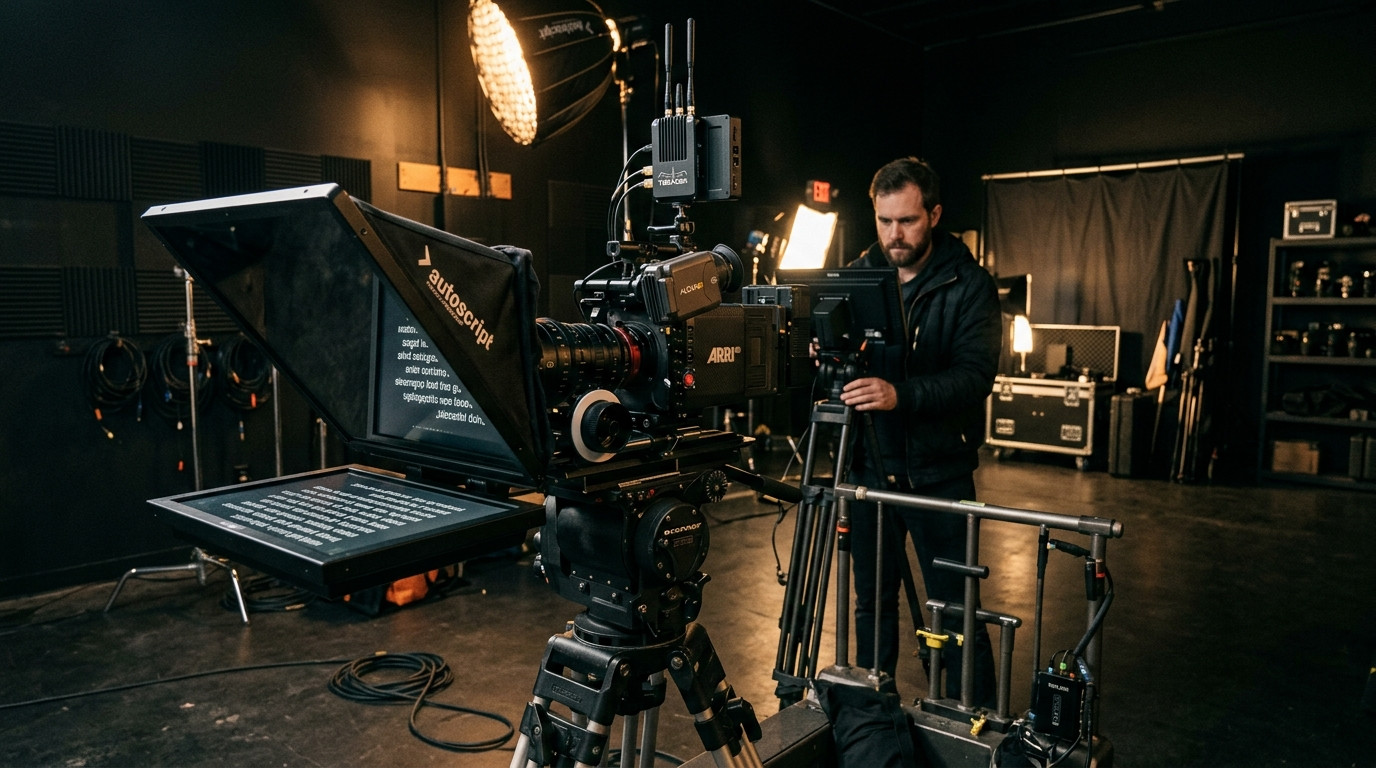
Few things ruin an otherwise flawless talking-head take faster than watching ghostly lines of script scroll across the talent’s eyeglasses. For directors of photography, video producers, and corporate studio teams, eyeglass glare is an optical headache that destroys audience connection. When a presenter wears glasses, their lenses act like miniature convex mirrors, bouncing studio lights and the glowing teleprompter monitor straight into the camera lens.
Fixing teleprompter reflections on glasses is not about asking talent to squint without their corrective lenses or pushing key lights into unflattering positions. It requires understanding optical geometry, polarizers, and prompter display contrast. With the right adjustments, you can completely kill screen reflection on glasses while preserving flattering, cinematic portrait lighting.
The Two Types of Teleprompter Glare on Camera
Before adjusting light stands, identify which reflection is hitting the lens. There are two distinct types of glare that plague presenters wearing glasses:
- Key and Fill Glare: Hot specular highlights from softboxes, umbrella lights, or ring lights reflecting off the outer surface of prescription lenses. This occurs when lights sit too close to camera axis.
- Prompter Screen Spill: Pale green, blue, or white light bouncing off the prompter tablet onto the presenter’s face and reflecting off the inner curve of their glasses. Viewers can visibly see the script rolling across their pupils.
Eliminating key light flare comes down to incident angles, while curing screen spill requires controlling the brightness, contrast, and optical path of your prompter display.
Mastering the 45-Degree Rule and Height Geometry
In optics, the angle of incidence equals the angle of reflection. If a key light sits directly behind or alongside the camera, its light hits the flat surface of the presenter’s eyeglasses and rebounds straight back into the sensor. Ring lights mounted directly around lenses are notorious offenders.
To clear the reflection from the camera’s sightline, move your key light to an angle between 40 and 45 degrees off the camera axis. At the same time, elevate the light fixture 2 to 3 feet above the talent’s eye level, tilting the modifier downward toward their cheekbones.
This compound angle bounces the light downward and toward the opposite wall rather than back into the lens. If you notice a soft glow lingering on the top rim of their frames, ask the talent to slide their glasses down their nose bridge by 2 millimeters, or raise their chair slightly so their chin tilts down a fraction of a degree. This tiny micro-adjustment alters the glass plane without looking unnatural on camera.
Using Circular Polarizers Without Ruining Beam-Splitters
Camera operators often reach for a Circular Polarizing Filter (CPL) to cut glass reflections. On conventional shoots, rotating a CPL eliminates reflections from car windows, water, and eyeglasses effortlessly. However, when paired with a 70/30 or 65/35 beam-splitter teleprompter rig, polarizers can introduce unexpected optical problems.
A beam-splitter glass pane already partially polarizes light. Placing a second polarizing filter on the camera lens behind the mirror can create strange color cross-polarization patterns, moiré, or an unexpected loss of three full stops of light. If you must use a CPL to cut harsh eyeglass coatings, mount the filter directly onto the camera lens inside the hood, then slowly rotate the ring while watching the monitor at 100 percent punch-in. Look for the exact null point where eyeglass reflections drop away without introducing chromatic tinting across the presenter’s skin tones.
Why High-Contrast Dark Prompter Interfaces Save Your Exposure
The biggest driver of eyeglass glare is an over-bright teleprompter tablet acting like an un-diffused secondary key light. When a tablet displays large blocks of glowing white background, that raw luminance bounces off the beam-splitter glass and floods the talent’s face.
Modern production workflows require dedicated teleprompter software built around a deep dark theme. Setting up Prompter Share gives your talent an ultra-clean, high-contrast dark viewer (#0B1416) that minimizes optical spill. Because Prompter Share only illuminates the exact text lines being read, the surrounding screen remains pitch-black, instantly dropping the reflected light volume hitting the talent’s frames.
Additionally, adjust the tablet’s physical backlight brightness down to 40 or 50 percent. The script should be crisp and legible to the talent, not bright enough to illuminate the room.
Eliminating Eye Darting and Optical Drift
When talent wears progressive lenses or bifocals, reading across a wide screen forces them to physically tilt their head up and down or dart their eyes left to right. This movement exaggerates reflections and looks unnatural to viewers.
To keep the presenter looking centered down the optical barrel of the lens, narrow your prompter script margins so each line contains only 4 to 6 words. When using Prompter Share, you can toggle the focus guide line marker (using the T key) to keep talent anchored to the sweet spot directly in front of the lens. Because Prompter Share features instant hardware-free beam-splitter mirroring (using the M key), your talent reads the crisp, properly formatted reflection through the glass while the operator manages formatting comfortably on their laptop controller.
Driving Takes Smoothly from the Camera Rig
When you are tweaking lighting angles and checking eyeglass reflections, stepping back and forth between your director desk and the camera tripod slows down the entire set. Solo creators and small video crews need the ability to adjust scroll speeds without walking into the frame.
Prompter Share solves this with a mobile phone remote link. The director, DP, or talent can hold a smartphone behind the camera to play, pause, increase speed, or jump lines without touching the control computer. The talent screen runs with built-in wake lock, preventing the tablet from dimming mid-take, while frame-accurate clock sync ensures the script never stutters or drops frames.
On-Set Eyeglass Glare Prevention Checklist
- Check Frame Coatings: Encourage talent to wear glasses with anti-reflective (AR) coatings. Avoid blue-light blocking lenses on camera, as they cast an unnatural purple or teal reflection that cannot be removed in post-production.
- Position Key Lights 45 Degrees Off-Axis: Raise modifiers above eye level and angle them down to push bounces below camera view.
- Flag Stray Studio Light: Ensure overhead studio lights or background fixtures are not hitting the rear side of the talent’s glasses.
- Dim the Prompter Display: Lower the tablet backlight to match the ambient ambient exposure of the studio.
- Run Dark High-Contrast Themes: Use Prompter Share to deliver high-contrast text on a pure dark field, eliminating ambient glass bounce and ensuring clean, reflection-free takes.