Teleprompter Cable Management: The DP Guide to Rig Power, Strain Relief, and Tangle-Free Takes
Master teleprompter cable management, power routing, and strain relief. Learn how to prevent tripod tilt drag, eliminate port damage, kill ground loop hums, and run streamlined remote prompting rigs.
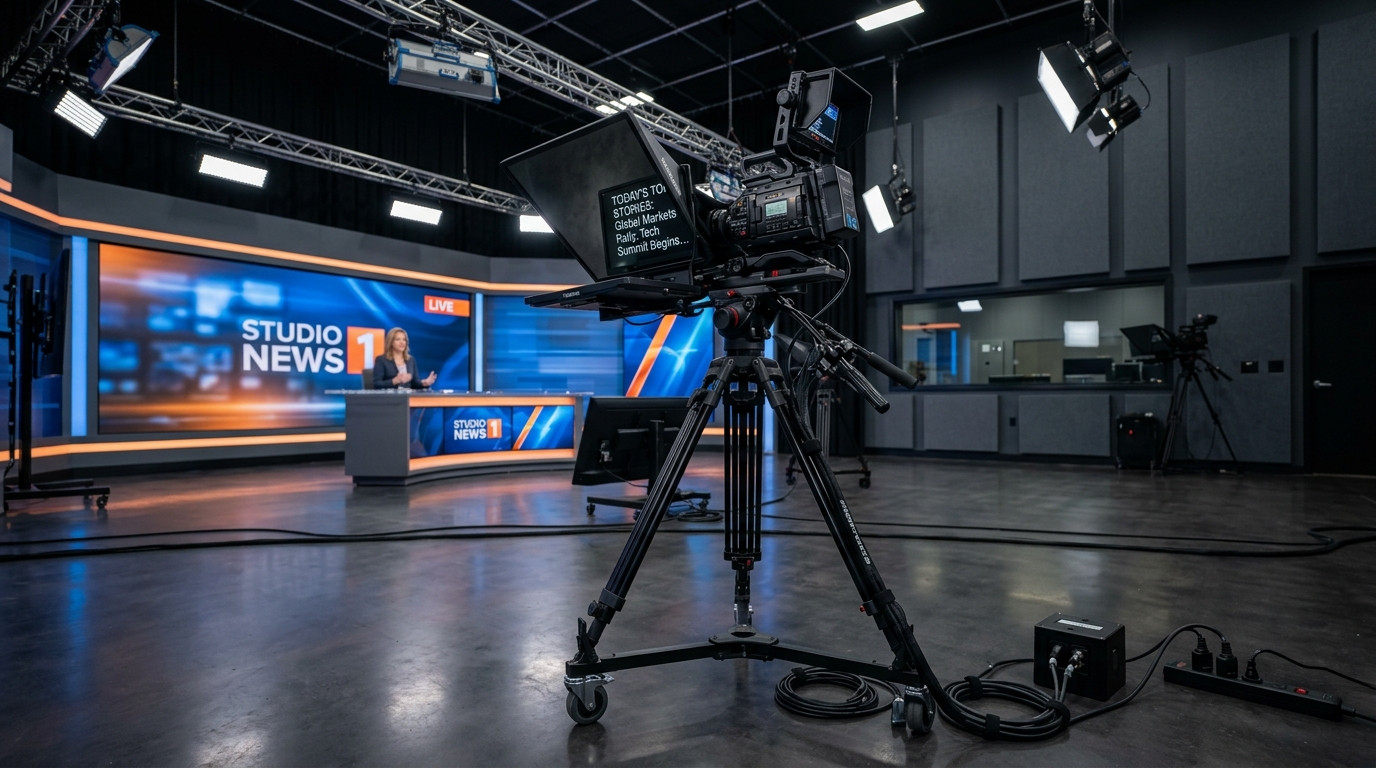
A front-heavy teleprompter rig creates enough mechanical leverage on its own. When you add heavy HDMI feeds, monitor AC power cords, USB charging cables, and audio lines hanging off the camera plate, you introduce severe operational headaches. Dangling cables introduce erratic drag during camera pans, exert destructive leverage on fragile micro-HDMI and USB-C ports, and create dangerous tripping hazards on studio floors.
The Hidden Physics of Cable Drag on Fluid Heads
Every cable suspended between your camera rig and the studio floor functions as a mechanical spring. When a teleprompter monitor cable hangs down freely, its gravitational weight pulls downward unevenly across the pan and tilt axes. If an operator attempts a subtle camera tilt or reframing maneuver, the tension in that hanging bundle resists movement, causing the fluid head to stick, slip, or spring backward when released.
Cable drag frequently ruins smooth camera framing. When you lock down a shot on a presenter, the resting tension in stiff AC or video cords will gradually creep the tilt angle over a five-minute corporate take. Eliminating cable pull requires treating every cord as a potential disruption to tripod counterbalance.
Anchor Point Routing and Service Loops
The golden rule of camera rig rigging is simple: never allow the weight of a cable to terminate at an electronic port. Every cord connecting to your teleprompter screen, camera body, or tally light must possess mechanical strain relief anchored to the camera cage, 15mm rails, or prompter sled before it reaches the jack.
- Build a rigid junction anchor: Fasten cables firmly to the prompter baseplate or rail block using dedicated anchors like Sprig cable mounts or heavy-duty hook-and-loop wraps. The anchor absorbs any unexpected tug or pull, shielding the monitor connector from shock.
- Leave generous service loops: Form a small, relaxed loop of cable between the anchor point and the display input. The connector should sit completely slack in the port, with zero rotational torque or lateral tension.
- Dress cables along the tilt axis: Route your umbilical bundle directly along the center pivot axis of your tripod fluid head. Fastening the bundle right at the rotational center minimizes the change in cable tension as the camera tilts up or down.
- Run lines down a single tripod leg: Bundle your outgoing cords inside split braided sleeving and lash them tightly down the rear tripod leg. This keeps the drop away from operator feet and prevents cables from snagging on spreader locks or studio dollies.
Eliminating Video Tethering with Browser Sync
The most effective way to solve cable clutter on a teleprompter setup is removing video cables entirely. Traditional teleprompter setups forced crews to string fifty feet of fragile HDMI or SDI cable from an operator workstation across the studio floor to the camera sled. These long video runs suffer from signal dropouts, require bulky scan converters, and tether the camera to a fixed desk.
Modern studio workflows replace hardwired video lines with high-contrast web synchronization. By deploying Prompter Share, you eliminate long monitor display cables completely. The operator runs the controller from any laptop anywhere on set, while the teleprompter tablet or display loads the script instantly via a simple browser link with frame-accurate clock synchronization.
Because Prompter Share features one-touch beam-splitter glass mirroring, the talent screen reflects readable text through 45-degree optical glass without requiring external HDMI hardware flip boxes or reversed operating system video feeds. Built-in wake lock guarantees the talent screen stays bright throughout long shooting blocks without dimming or sleeping mid-take.
Centralized Rig Power and Ground Loop Isolation
Power delivery is the second major source of teleprompter cable mess. Powering a teleprompter monitor from a wall brick while the camera runs on battery or a separate wall circuit often introduces distinct electrical issues.
- Preventing ground loop hum: When your teleprompter monitor, video transmitter, and camera share interconnected copper video lines plugged into separate AC wall outlets, tiny voltage differentials between electrical grounds create ground loop hum. This produces rolling horizontal hum bars on monitors or audible 60Hz buzzing in production audio tracks.
- Consolidating to a single DC source: The cleanest setup powers the camera, teleprompter monitor, and auxiliary wireless gear from a single onboard V-mount or Gold-mount battery plate using regulated D-Tap outputs. A centralized power source guarantees a shared common ground, killing hum at the source.
- Dedicated short jumper cables: Replace factory six-foot power cords with custom six-inch or twelve-inch right-angle cables. Tightly measured runs eliminate sprawling loops of excess wire that catch on studio light stands and boom poles.
Camera-Side Operation and Mobile Remote Links
On fast-moving commercial and corporate video sets, the director or director of photography frequently needs to start, pause, or adjust the script without being tethered to a production cart. Running foot pedal wires or tethered USB hand controllers up to the camera operator introduces yet another tripping hazard across the set floor.
Prompter Share resolves this friction with a dedicated phone remote link. An operator standing right beside the camera matte box can pull out their smartphone and play, pause, jump lines, or adjust scroll speed on the fly without running a single wire. For studio teams balancing multiple monitors, upgrading to the Prompter Share Pro plan provides unlimited session time, folders organized by client shoot, and multi-screen support across your entire camera package.
The Pre-Roll Cable Integrity Checklist
Before calling talent to the marks, execute a rapid physical inspection of the teleprompter rigging:
- Confirm that every cable connection on the prompter monitor has positive strain relief before entering the chassis.
- Perform a full manual tilt up and tilt down test to confirm that your cable bundle produces zero resistance, rubbing, or balance shift across the fluid head travel.
- Check that charging cables running to prompter tablets seat securely and do not pinch when folding or sliding the prompter glass hood.
- Tape down any unavoidable floor runs using heavy-duty gaffer tape, applying flat cross-strips every three feet to keep pathways safe for production crew.
Clean cable management protects delicate camera gear, prevents mid-take interruptions, and keeps your rig balanced for dependable framing. Streamline your rig hardware and experience zero-friction prompting by launching your next shoot on Prompter Share.