Teleprompter for Church Sermons: How Pastors Can Preach Naturally on Camera
A practical guide for pastors and church production teams on using a teleprompter for sermons, from discreet pulpit placement and livestream setups to writing scripts that sound natural on camera.
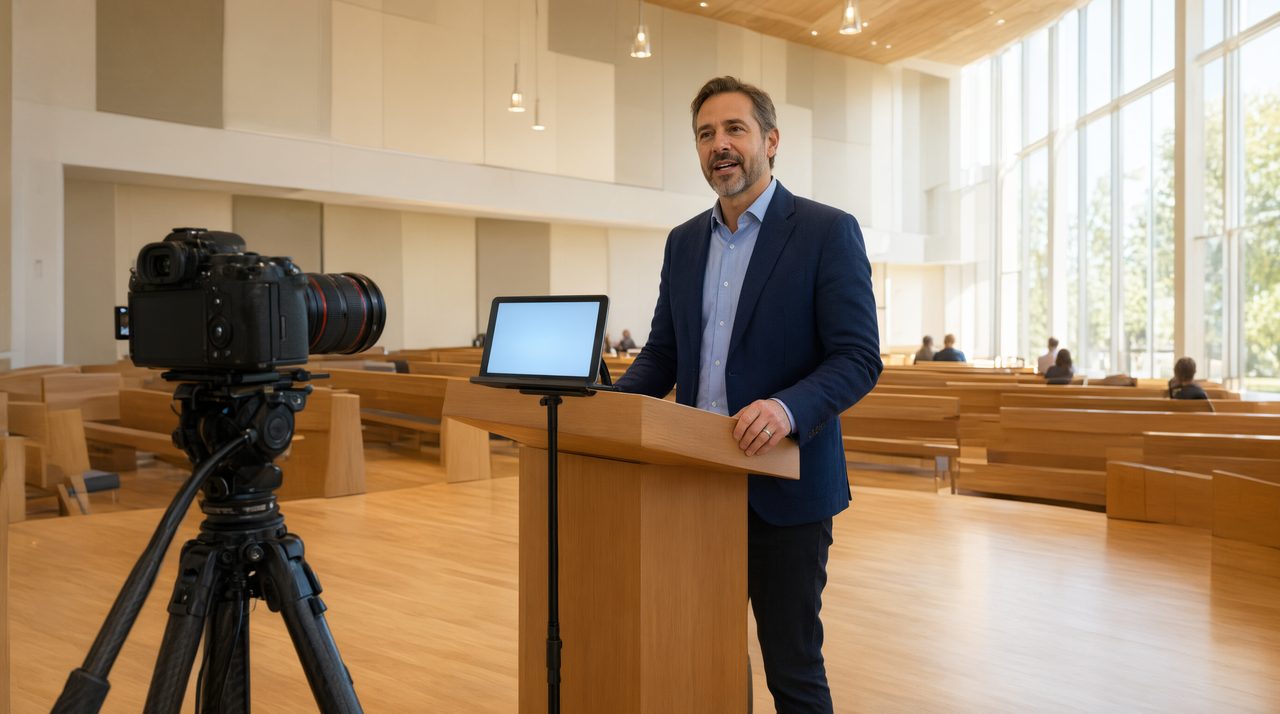
A pastor can preach naturally with a teleprompter when the script is written the way people actually speak, the scroll speed matches a calm speaking pace, and the screen sits close to the camera lens so glances look like eye contact. The goal is not to read a sermon in a flat voice. The goal is to stop worrying about what comes next, so attention stays on the message, the room, and the people watching online. With a discreet setup and an operator controlling the pace, most listeners will never think about the technology at all.
How do you set up a teleprompter for a sermon without the congregation noticing?
Start with placement, not gear. Put the screen as close as possible to the camera lens, just below it or beside it, so a quick glance reads as looking at the viewer. In a sanctuary, a tablet on a low stand at the pulpit often disappears into the furniture, especially when brightness is turned down to match the room. If the church uses a beam splitter rig, mirroring flips the text so it reads correctly through the glass, and the audience sees only the preacher.
For the room, a second screen can help even more. A confidence monitor on the floor or on a music stand lets the preacher glance down naturally, the way a speaker glances at notes, while the camera still captures a warm, forward facing delivery. With Prompter Share, multiple viewer screens stay on the same line, so a pulpit tablet, a confidence monitor, and a director monitor can all show the same place in the sermon. That shared timing keeps the preacher, the slides, and the camera operator moving together.
What is the best teleprompter setup for a church livestream?
For a livestream, the simplest reliable setup is one operator, one script, and one link for talent. The operator runs the script from a desk or the production booth, and the preacher opens a single shareable link on a phone, tablet, or television. Talent needs no account and nothing to install, which matters on a Sunday morning when a guest speaker or volunteer may fill in with little notice. If a device drops off Wi-Fi, it rejoins on the right line instead of restarting the sermon.
An operator is worth having even when the preacher could scroll alone. The operator can pause during prayer, hold during a congregational response, step back to repeat a key line, and speed up gently when the preacher finds a natural rhythm. Speed presets go down to about 0.45 lines per second, so a slow, reflective passage does not feel rushed. A settable count-in also gives the preacher a calm moment to breathe before the first line appears.
On Pro, a phone works as a remote control, which helps when the operator also runs slides or cameras. The free plan covers 2 minutes of remote prompting per session, with only time that has a viewer connected and the script moving counting toward that limit, and rehearsing alone is free with unlimited restarts. That makes it easy to test a full sermon flow before committing to a paid plan. Pro at $15 per month adds unlimited prompting time, unlimited viewer screens, and unlimited scripts in folders for churches running several services each week.
How should you write a sermon script for a teleprompter?
Write for the ear, not for the page. Use short sentences, plain language, and natural pauses. Read each section aloud as you write it, and cut any sentence you would not actually say to a room full of people. Mark pauses with a line break or a simple cue, and spell out Scripture references the way you will say them, so you never translate a reference in your head while live.
Break the sermon into clear sections the operator can see at a glance, such as opening prayer, first point, illustration, application, and closing prayer. On Pro, countdown and cue markers help the operator land on those sections quickly if a service runs long and a section must be shortened. Keep names, numbers, and announcements in short lines, since those details are most likely to trip up a speaker under pressure.
How do you rehearse with a teleprompter before Sunday?
Rehearse in the actual room, with the actual screen, at least once. Stand at the pulpit, look at the camera, and speak the opening five minutes at full volume. Watch the recording afterward and listen for places where you speed up, mumble a transition, or stare at the screen instead of glancing at it. Those are usually script problems, not talent problems, and a shorter sentence or clearer cue will fix them faster than another hour of practice.
A calmer Sunday for preachers and production teams
Churches do not need a broadcast studio to sound confident on camera. They need a script written for speaking, a screen placed near the lens, an operator who can follow the preacher, and a rehearsal that catches rough spots before the service. Done well, a teleprompter does not make a sermon feel scripted, it makes it feel prepared, steady, and easier to follow, both in the room and online. To try it with your next sermon, visit promptershare.com and run a rehearsal with your own script.
Can a pastor use a teleprompter and still sound natural?
Yes, when the script sounds like spoken language and the scroll speed matches the preacher. Familiar material, short sentences, and an operator who pauses during prayer will sound far more natural than a preacher struggling to remember a long manuscript.
Does the congregation see the teleprompter screen?
Usually not, when the screen sits near the camera lens or low at the pulpit and brightness matches the room. A confidence monitor or pulpit tablet blends into the setup, and beam splitter mirroring keeps text readable for the preacher while the audience sees only the speaker.
What if the internet drops during a sermon?
A device that drops off Wi-Fi rejoins on the right line with Prompter Share, so the preacher does not lose the place in the sermon. Keep a printed copy at the pulpit as a backup, and agree on a simple hand signal with the operator for pause or hold.
Add Prompter Share as a preferred source on Google (opens in a new tab)