How to Coach Nervous Executives and Non-Actors on a Teleprompter: The Director's On-Set Playbook
Turn stiff, robotic corporate reads into authentic on-camera conversations. Discover practical directing techniques, rehearsal drills, script tweaks, and remote prompter controls that put nervous talent at ease.
The Anatomy of Teleprompter Anxiety on Set
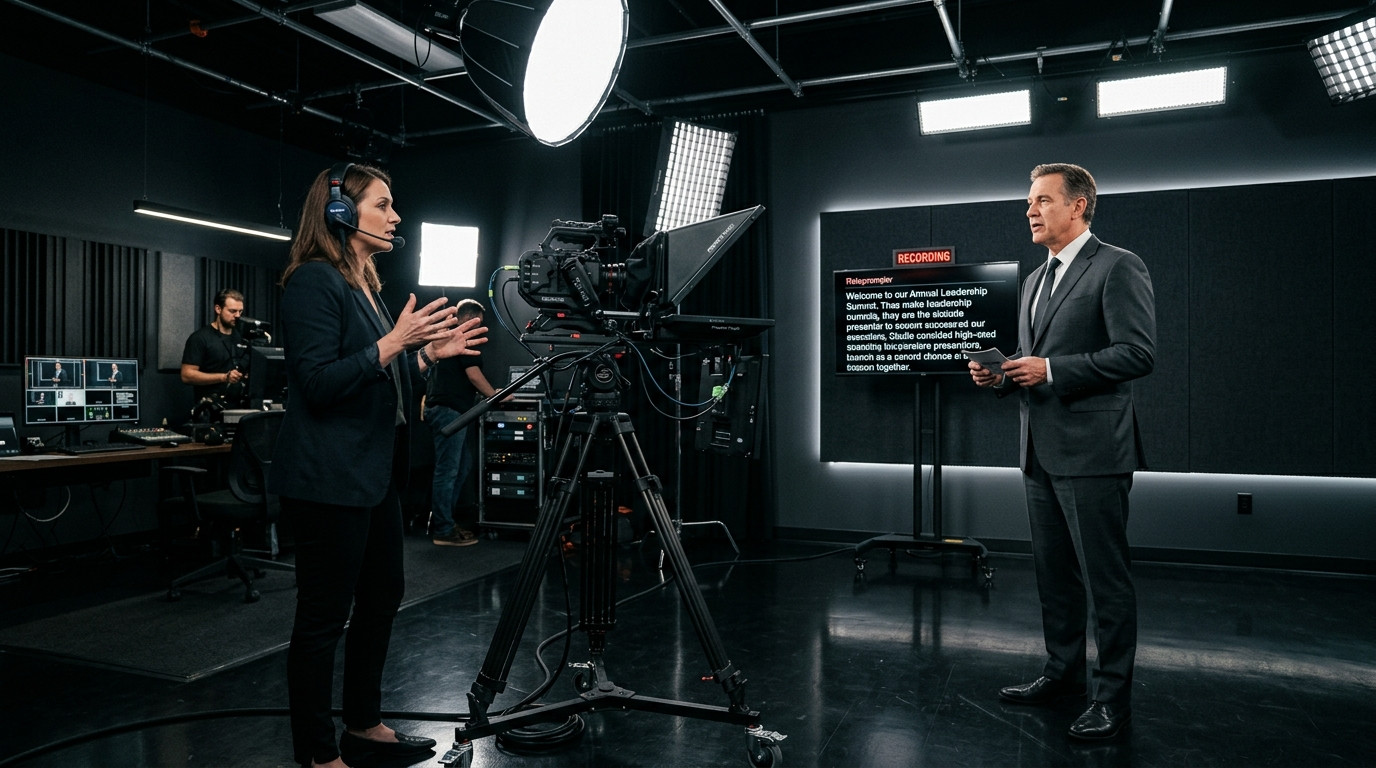
Putting a nervous executive, startup founder, or internal subject matter expert in front of a camera lens can instantly turn confident professionals rigid. When you place a beam-splitter glass rig between them and the camera, their cognitive load doubles. Instead of having a normal conversation, they suddenly worry about reading speed, stumbling over corporate buzzwords, and looking robotic. The telltale signs show up immediately on your monitor: widened eyes, shallow breathing, rigid shoulders, and a monotone cadence that tracks words like a ping-pong ball.
As a director or video producer, your responsibility is not merely to capture crisp footage. Your real job is managing emotional momentum and human performance. A teleprompter should serve as an invisible safety net rather than a mental trap. With the right rehearsal protocol, physical cues, and agile software control, you can guide non-professional talent from terrified stiffness to a relaxed, authoritative delivery that connects with audiences.
Pre-Take Calibration: Rewriting Script Friction on the Fly
Most teleprompter failures begin long before the red recording light turns on. Non-actors freeze up because corporate scripts are almost universally written for the eye rather than the ear. When an executive reads legal disclaimers or multi-clause marketing jargon out loud, their vocal cords fight against unnatural sentence structures.
Before you begin rolling takes, sit down with the speaker and read the script together aloud at conversational volume. Listen for micro-stumbles. If the presenter catches their breath, trips over compound adjectives, or hesitates on industry acronyms, stop immediately and rewrite the line right on the prompter display. Replace formal phrasing with natural contractions. Break twenty-word compound sentences into three-word impact statements. Write phonetically for difficult terminology so talent never pauses to decipher syllables.
Because adjustments happen during active rehearsals, modern production crews need software that allows real-time edits without breaking the talent view. Using Prompter Share, an operator can tweak text lines or adjust line breaks directly on a laptop controller while the updated copy instantly reflects across the studio on the talent's iPad or teleprompter monitor with zero reload delay.
The Directing Protocol: Three Takes to Natural Cadence
Throwing an untrained presenter straight into a full-speed teleprompter take guarantees anxiety. Instead, run your talent through a structured three-step progression that decouples script comprehension from performance pressure.
- Take Zero (The Silent Eye Pass): Have the presenter read the entire script silently on the prompter while you run the scroll at moderate speed. This eliminates unfamiliarity so their brain registers paragraph length and key transitions without the stress of vocalizing.
- Take One (The Exaggerated Radio Read): Ask the talent to look away from the camera lens and read the script aloud to you off-axis, using deliberate, exaggerated conversational hand gestures. Removing the intimidation of the glass lets them find their natural speaking cadence and vocal warmth.
- Take Two (The Invisible Safety Net): Swing them back directly into the lens. Remind them that the words on the glass are only there to catch them if they drop an idea. Their target is not the scrolling glass, but the imaginary friend standing directly behind the sensor.
Pacing Dynamics: The Speaker Leads, the Operator Follows
The single most destructive mistake inexperienced crews make is forcing the talent to chase the teleprompter scroll speed. When a speaker feels chased, their cadence accelerates unnaturally, breathing turns shallow, and vocal inflection flattens out entirely. The golden rule of teleprompter operation is simple: the talent always sets the rhythm, and the prompter operator follows behind their eyes.
Instruct your talent to take generous pauses between sentences. A two-second pause on set feels like an eternity to a nervous executive, but on video, that silence translates as executive presence, confidence, and deliberate authority. Tell the presenter that whenever they pause to breathe or emphasize a point, the text will wait for them. To maintain that level of responsiveness, operators need variable scroll controls and instant line jumping.
With dedicated keyboard shortcuts in Prompter Share, operators can jump backward or forward two lines using simple arrow keys, tap the spacebar for instantaneous pause, or smoothly modify scroll rates between speeds one and ten. When operating as a lean solo crew, you can hand control directly to someone standing right at the camera using a smartphone remote link, keeping production adjustments unobtrusive.
Eliminating the Deer-in-Headlights Gaze
When non-actors read a teleprompter, they often develop a fixed, unblinking stare that looks unnatural on camera. This happens when the text margin is stretched too wide or when the talent stands too close to the glass rig, forcing noticeable horizontal eye travel.
Back your camera rig up to eight or ten feet from the presenter and punch in with an 85mm or 100mm portrait focal length. At that distance, the angle of subtended vision shrinks, meaning horizontal eye tracking becomes completely undetectable on camera. On the display software, narrow the script margins into a tight center column directly in front of the lens pupil.
Encourage natural physical movement. Instruct nervous speakers to blink naturally, tilt their head slightly when changing thoughts, and use subtle shoulder expressions. If an executive locks their body in place, ask them a casual question about their weekend, cut the feed, and point out how relaxed their posture was during casual conversation. Replicating that physical freedom unlocks natural charisma on camera.
Bulletproof Technical Redundancy for High-Stakes Shoots
Nothing shatters a nervous executive's fragile confidence faster than technical failure mid-take. When an iPad screen dims, Wi-Fi latency causes text to stutter, or cables get kicked loose on set, talent loses focus and anxiety floods back in.
Eliminate technical friction before the speaker arrives on set. Traditional production monitors require messy HDMI cabling and external hardware image inverters to fix reversed mirror reflections on 45-degree beam-splitter glass. By utilizing Prompter Share, hardware mirror toggles flip text horizontally with a single press of the M shortcut key, leaving the operator laptop readable while the glass reflection projects upright text.
Furthermore, browser-based wake lock ensures tablet batteries and display timeouts never sleep mid-sentence. Frame-accurate clock synchronization prevents jitter across devices, allowing solo creators and production teams to keep setups clean and reliable. When talent realizes the technical environment is steady, their internal panic recedes.
Turn Nervous Reads into Executive Authority
Coaching non-professional talent through a video shoot requires patience, empathy, and uncompromising technical precision. By simplifying the script for spoken cadence, establishing a calm rehearsal sequence, and letting the speaker control the flow of the room, you turn reluctant speakers into compelling presenters.
Pairing thoughtful directing craft with dependable, friction-free prompting technology creates a studio atmosphere where clean takes become routine. Explore the browser-driven workflow at Prompter Share to keep your next shoot moving smoothly from the first rehearsal to final wrap.