Teleprompter Setups for Standing vs. Sitting Presenters: The DP and Director Guide
Learn how to dial in optical eye lines, tripod pedestal heights, beam-splitter glass angles, and prompter scroll mechanics when switching between standing presenters and seated talking heads.
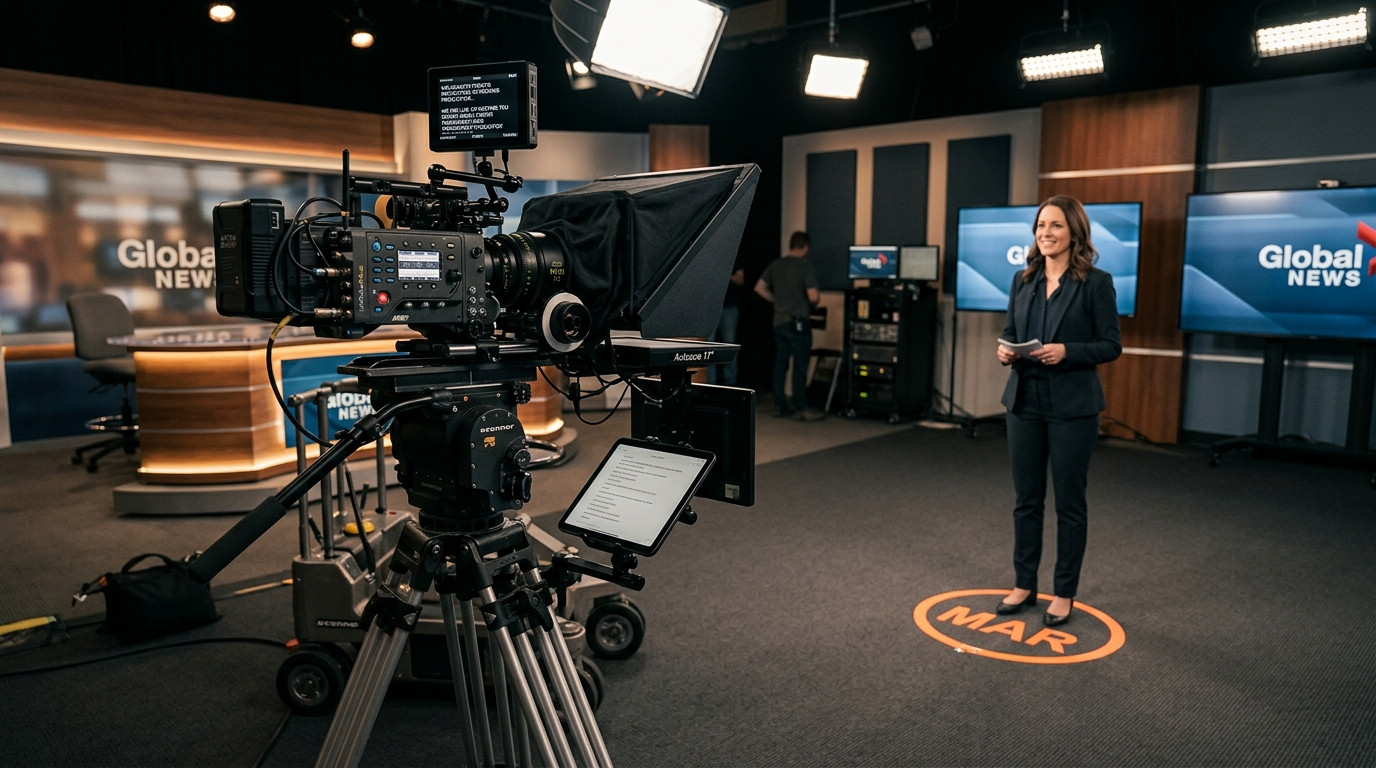
Switching a talent setup from a seated desk interview to a standing presentation changes far more than just camera height. For directors of photography and studio producers, posture transforms eye-line geometry, diaphragmatic breathing, head mobility, and how talent visually tracks text across a beam-splitter glass rig. When an operator attempts to shoot a standing presenter using the exact same tripod position and scroll pacing as a seated executive, the resulting takes often feel either rigid and frozen or noticeably disconnected from the lens.
The Core Ergonomic Differences Between Standing and Seated Takes
When talent sits in a studio chair, their posture stabilizes around their core and pelvic base. Their eye line stays locked within a narrow vertical band of two to three inches, which makes optical alignment straightforward. However, seated subjects also compress their diaphragm, which can reduce vocal resonance, flatten conversational inflection, and encourage a passive, laid-back delivery.
Standing presenters bring genuine physical presence, natural hand gesturing, and deeper vocal support. The challenge on set is dynamic sway. Presenters naturally shift weight from heel to toe or rock subtly between takes. If your camera package and beam-splitter hood are improperly positioned, this subtle movement translates into jarring eye darts, chin tilts, and missed lines.
Dialing in Lens Height and Beam-Splitter Glass Angles
The standard rule for seated talking heads is setting the lens optical center exactly level with the subject's eye line. This creates direct, peer-to-peer visual intimacy with the audience. With a 45-degree beam-splitter teleprompter rig, the center of the optical glass sits flush with the front element of your cine lens.
For standing talent, novice operators often make the mistake of raising the tripod head too high or tilting the head downward to frame the torso. Downward camera tilt distorts the reflective angle of the glass hood, forcing standing talent to crane their necks up toward the ceiling to read incoming lines. To maintain an authentic gaze, follow these physical rigging standards:
- Keep the Optical Axis Level: Raise the tripod pedestal or studio column so the optical center matches the presenter's standing eye level without adding severe vertical tilt to your fluid head.
- Step the Camera Back: Increase camera distance by two to three feet compared to a seated interview setup. Switching from a 35mm lens close up to a 70mm or 85mm lens further away collapses the reading angle, completely eliminating horizontal eye tracking across the glass.
- Check the 45-Degree Reflection Plane: Ensure the beam-splitter mirror sits at a true 45-degree angle relative to the optical axis so reflected text appears floating directly on top of the lens element without double-ghosting or contrast reduction.
Formatting Text Margins for Standing Mobility
Seated talent can comfortably process wider text margins because their head is motionless. A standing presenter, however, requires a tight, centered column of text. If the copy spans edge-to-edge on a twelve-inch or fifteen-inch tablet screen, the presenter's pupils will visibly swing left and right across the frame, breaking the fourth wall and telegraphing that they are reading off a prompter.
Format your script display so lines contain between three and five words each. This creates a vertical cascade of words that lands right in the presenter's central foveal vision. They absorb each phrase with zero lateral eye movement, keeping their gaze glued straight down the lens barrel.
Modern studio workflows rely on zero-friction software to handle this formatting seamlessly. Using Prompter Share, operators can adjust the resizable split view and instantly calibrate talent font sizes and line margins on the fly from any laptop. Because talent opens a single browser link with no sign-in required, you can mount an iPad or Android tablet directly onto your standing rig and launch prompt playback in seconds.
Scroll Speed Calibration and Physical Body Cadence
Posture fundamentally alters delivery tempo. Seated speakers average 120 to 140 words per minute, often speaking in relaxed, continuous cadences. Standing presenters naturally pause longer between key concepts, emphasize punches with physical hand gestures, and project their voice at 140 to 160 words per minute.
Because standing cadence fluctuates with bodily energy, a static auto-scroll script quickly leads to disaster. The text either races ahead while the speaker pauses for emphasis, or drags behind while the speaker hits their stride. The director or prompter operator must drive the script dynamically, letting the speaker pull the words rather than having the text push the speaker.
- Use Real-Time Variable Speed: Adjust scrolling continuously using responsive keyboard shortcuts or speed controls to mirror the talent's natural pauses and breathing cycles.
- Lock the Reading Marker to the Lens Axis: Activate the central line guide so the talent always knows which line aligns with the camera center.
- Eliminate Scroll Drift: Utilize platforms engineered with frame-accurate clock synchronization so the operator control view and talent screen never lose step during fast speed adjustments.
Solo Standing Workflows: Operating from the Camera Position
Solo content creators, YouTubers, and one-man video crews face a specific tactical dilemma on standing shoots. You have to walk onto your mark, check your framing monitor, inspect audio levels, and deliver high-energy takes without running back and forth to a desk computer to hit play.
Traditional rigs require clumsy wired foot pedals or cheap plastic clickers that fail to connect over Bluetooth. With Prompter Share, you can open a secondary phone remote control link on your smartphone. You can stand on your camera mark, adjust your focus, and smoothly tap play, pause, or jump lines straight from your mobile device while your standing tablet prompter displays frame-accurate copy. Built-in wake lock guarantees that your talent screen will never dim, sleep, or lock mid-sentence during complex, multi-minute standing takes.
Pre-Flight Production Checklist for Standing Takes
Before calling for sound and rolling the camera on a standing presenter, run through this quick physical checklist:
- Mark the Talent Base: Place gaffer tape T-marks on the floor for both feet to prevent talent from wandering outside your lighting sweet spot or drifting off your focal plane.
- Verify Eyeglass Reflection: Check your field monitor for glare. Standing talent shifts the reflection angle from overhead studio softboxes into their spectacles. Reposition your key lights slightly higher or further to the side if needed.
- Toggle Hardware-Free Mirroring: If running a 45-degree beam-splitter glass rig, press the M shortcut to flip the talent text horizontally while keeping the director control interface standard and legible.
- Run One Throwaway Rehearsal: Have the talent deliver the opening two paragraphs on their feet at full presentation energy. Watch their eyes on the field monitor to verify that line width and text height feel effortless.
By balancing thoughtful physical ergonomics, proper focal lengths, and flexible remote controls, you can direct standing and seated talent with equal confidence. The result is authentic, broadcast-grade camera presence that looks completely unscripted.