Teleprompter for Video Podcasts: Nail Sponsor Reads and Episode Intros Without Sounding Scripted
Your intros, sponsor reads, and outros make or break a video podcast episode. Here is how to use a teleprompter for those high-stakes moments, from rig setup to writing scripts that sound natural.
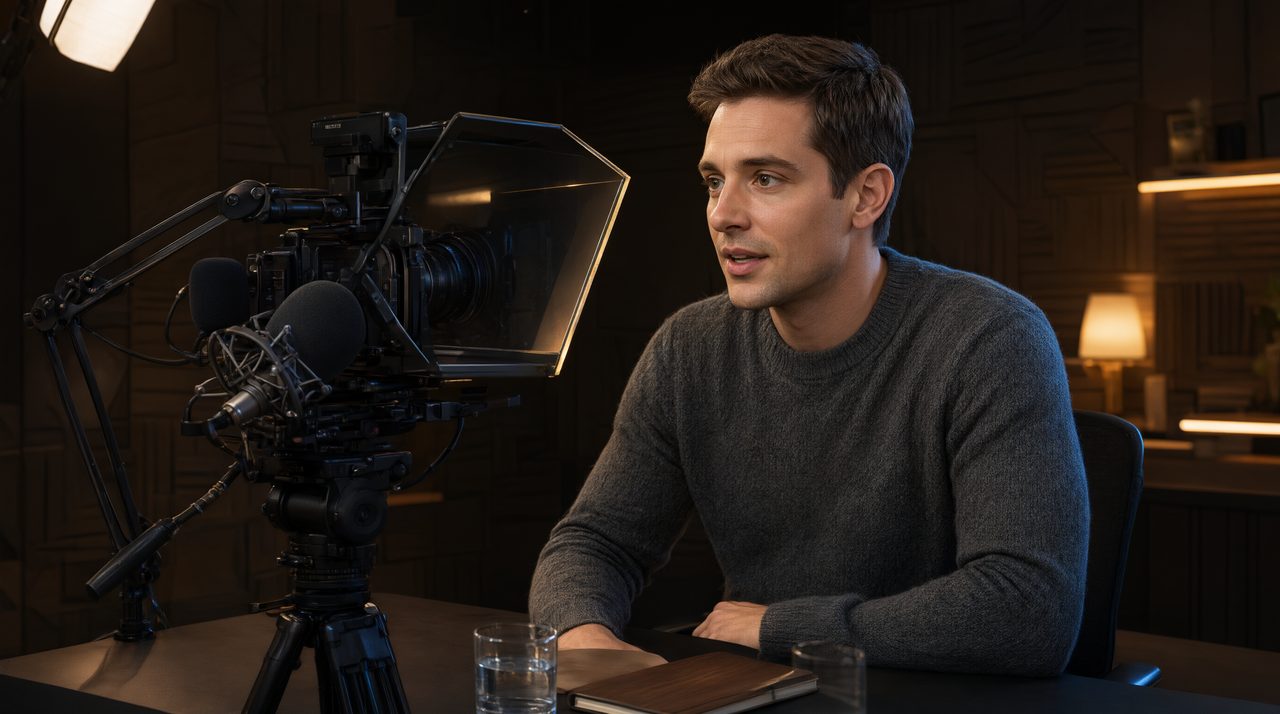
Video podcasts changed the deal for hosts. You are no longer just talking into a microphone in a quiet room, you are performing for a camera too. The parts of the show that matter most for growth, the cold open that keeps a viewer from clicking away, the sponsor read that pays the bills, the outro that turns a casual watcher into a subscriber, are also the parts where ad-libbing tends to fall apart. This is exactly where a teleprompter earns its place in a podcast studio.
Why Video Podcasters Are Ideal Teleprompter Users
Most episodes are conversations, and nobody needs a script for the middle of a good interview. The magic happens in the bookends. Your intro sets the tone, your sponsor read needs to hit specific talking points, and your outro has to land the call to action without rambling. A prompter lets you lock those segments down while staying conversational for the rest. Hosts who have recorded even a dozen episodes know the pattern. The intro you nail in rehearsal turns into a three-minute meander once the red light is on. Reading from a prompter in front of your camera keeps your eyes on the lens, which is what separates an episode that looks confident from one that looks like you are glancing at notes.
The Three Moments a Prompter Pays for Itself
First, the cold open. You have about ten seconds to earn the click on YouTube, so your opening line needs to be tight and deliberate. Write it, prompt it, and deliver it straight down the barrel of the lens. Second, the sponsor read. Advertisers send talking points they expect you to cover, and hosts who paraphrase them on the fly miss half of them. A prompter with the required points loaded means every read is complete and consistent,. Third, the outro. Endings are where energy dies. Having your sign-off, your subscribe ask, and your next-episode teaser on screen means you finish strong instead of trailing off with five versions of thanks for listening. Some hosts also prompt the guest introduction, since butchering a guest's title is the fastest way to start an interview badly.
Setting Up Your Podcast Prompter Rig
You do not need a broadcast budget. The simplest setup is a tablet on a stand just under the lens, running a cloud prompter app your producer can control from a phone. That phone remote control matters more in a podcast setting than anywhere else. Your engineer or co-host can scroll the script, pause it while you riff, and jump sections when the conversation runs long, all without reaching across the table. For the full eye-contact effect, a beam-splitter mirror rig places the script directly in front of the lens so you are literally looking at your viewers while you read. Either way, match the display to your seating distance, mount it at lens height, and use large bold text with high contrast. If the screen sits noticeably below the camera, viewers will sense the eye drift even if they cannot name it.
Write Scripts That Do Not Sound Scripted
The prompter gets blamed for stiff delivery, but the real culprit is usually the writing. Write the way you talk, not the way you type. Short sentences, contractions, and the phrases you actually use in conversation. Read every script aloud before recording day. If a sentence makes you stumble on paper, it will be worse on camera. Mark your pauses. Simple line markers or break cues give you natural breathing room and stop you from racing through the words. And here is the trick veteran hosts swear by: script your bullet points, not your sentences, for the conversational parts, and script every word only for the sponsor reads and CTAs. That hybrid approach keeps the discussion natural while guaranteeing precision where it counts.
Dial In Scroll Speed and Markers
Set your scroll speed slightly slower than your natural speaking pace. You can always nudge it up with a remote, but a script that outruns you creates panic the camera picks up instantly. Run a thirty-second test read before the episode and adjust until your eyes stay relaxed. Use line markers to flag segment changes, like the shift from intro to guest bio or from discussion to sponsor read. Enable wake-lock on whatever device runs your prompter, .
Multi-Cam Considerations
If you record with more than one camera, sync the script across talent screens so the host and co-host see the same text at the same time. Cloud-based prompters handle this with zero lag, which matters when your co-host is supposed to pick up the next line. Feed each camera position its own display, even a phone on a stand. Consistency across angles means your editor can cut freely between cameras without one shot showing an eye-line shift another does not.
Mistakes That Ruin the Read
Reading word for word without lifting your eyes is the classic failure, and it comes from scrolling too fast and panicking. Slow the scroll, glance at the phrase, then deliver it to the lens. Another mistake is scripting the entire episode, which flattens the conversation and turns an interview into a recital. Over-lighting the display is a subtler trap. A screen at full brightness will wash out your face and reflect in glasses, so dim it to the lowest readable level. Finally, do not skip the rehearsal read. Two minutes of practice saves twenty minutes of re-records,
Make It Part of Your Workflow
The hosts who get the most from a prompter treat it like any other piece of studio gear. Scripts get loaded the night before, the scroll speed gets tested during setup, and the remote stays in the producer's hand throughout the record. If you produce video content for clients as well as your own show, the same skills transfer directly. You can see how polished delivery lifts an entire production in the work from Envy Creative, where scripted segments and natural conversation blend the same way, tight where it counts and loose everywhere else. Start with just your intro and sponsor reads on the prompter, and expand as the workflow becomes second nature. For a cloud teleprompter that runs on the devices you already own, syncs across every talent screen, and puts scroll control in your producer's pocket, Prompter Share is built for exactly this setup. Your next episode can sound sharper with less effort than your last one took.