The Video Podcast Teleprompter Workflow: How to Handle Sponsor Reads, Intros, and Bulleted Runs of Show
Learn how top video podcasters and studio producers use remote teleprompters for seamless ad reads, tight show intros, and conversational bullet points without sounding scripted.
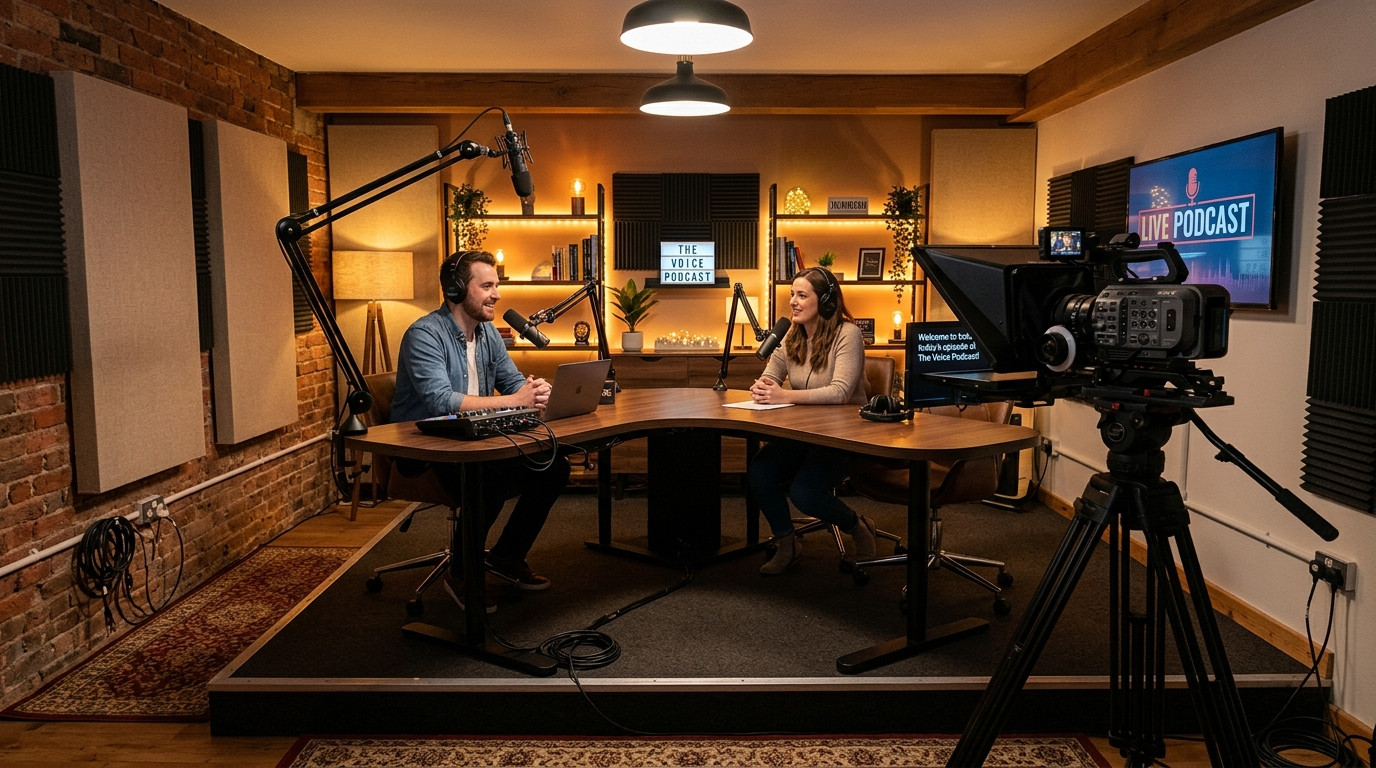
Video podcasting lives or dies on perceived authenticity. When an audience tunes into a visual podcast or watch-along show, they expect direct eye contact, relaxed delivery, and candid reactions. The moment a host looks down at physical notes, glances off-camera toward a production monitor, or stumbles through an ad read, viewer immersion shatters. Yet memorizing five sponsor mandates, strict legal disclaimers, guest bios, and a 45-minute episode outline is unrealistic on tight studio schedules.
Integrating a teleprompter into a podcast studio bridges the gap between conversational freedom and production precision. The goal is not to read an entire essay word for word. Instead, professional podcasters use prompts strategically for high-stakes moments while maintaining natural eye contact down the barrel of the lens. With modern tools like Prompter Share, you can run prompts wirelessly across camera rigs, tablets, and phones without running heavy video cables across your desk.
The Hybrid Scripting Model: Intros, Sponsor Reads, and Anchor Points
The biggest mistake creators make when adding a prompter to a podcast studio is pasting an entire conversational monologue into the script window. That turns lively debate into robotic line reading. High-performing studios rely on a three-tier hybrid format:
- Verbatim Show Intros: The opening hook sets the tone, introduces the guest credentials, and outlines episode topics. Script this word for word to eliminate meandering and hook algorithmic retention within the first fifteen seconds.
- Exact Sponsor Reads: Brands pay for accurate call-to-action language, promo codes, tracking URLs, and FTC compliance disclosures. Scripting sponsor spots verbatim prevents retakes that kill interview momentum.
- Bulleted Run of Show: For open discussion and interview questions, format the prompter text as capitalized bullet points and bold section anchors. This keeps the conversation structured without boxing anyone into a rigid sentence structure.
Studio Rigging: Beam-Splitter Glass vs Off-Axis Prompter Displays
In podcast setups, host eye-lines are critical. If your prompter sits above or to the side of the camera lens, viewers immediately detect that your gaze is fixed slightly off-center. Over an hour-long episode, persistent eye-line misalignment makes the host feel detached.
For primary host cameras, mount a 45-degree beam-splitter glass rig directly to your 15mm rail system or heavy C-stand. A cinema camera such as a Sony FX6 or mirrorless hybrid shoots cleanly through the glass, while an iPad or compact display mirrors text underneath. Because beam-splitter glass reverses reflected images, your prompting software must support instantaneous horizontal and vertical mirroring. In Prompter Share, pressing the M shortcut or tapping the mirroring toggle flips the text output cleanly on the viewer screen while leaving the producer controller text normal and upright.
If you run a guest interview desk with wide and tight angles, you can also place secondary viewer screens right below the eyeline of co-hosts. Because Prompter Share runs in standard browsers without app installations or hardware video splitters, any spare tablet or monitor on the desk can act as a live synchronized cue display.
Setting Up Seamless Remote Control on Set
Podcast environments are unpredictable. Guests talk longer than planned, co-hosts jump ahead to unexpected topics, and producers need to adjust ad timings on the fly. You cannot rely on static autoscrollers or cheap Bluetooth pedals that lose pairing mid-episode.
The cleanest workflow separates control from display. With Prompter Share, the host or technical director drives the script from a laptop in the control booth or behind the desk. At the same time, the talent reads on an iPad mounted in the beam-splitter hood. Built-in frame-accurate clock sync guarantees that both screens match perfectly without lag, even over standard studio Wi-Fi.
If you record solo from the desk and need to adjust scrolling without reaching for a keyboard, generate a phone remote control link. That secondary mobile URL allows you to pause, speed up, or jump back two lines using simple thumb controls on your smartphone, tucked discretely beneath the tabletop edge.
Formatting Podcast Prompts for Smooth On-Air Delivery
Reading aloud demands a completely different visual presentation than reading an article on a screen. When formatting your podcast script and outline, apply these producer-tested rules:
- Keep Text Margins Tight: Never run text full-width across a wide tablet screen. Narrow the margins so text sits in a central column directly over the camera lens. This eliminates horizontal eye darting and keeps your gaze locked with the lens.
- Spell Out Numbers and URLs: Write out figures and links phonetically. For example, write dot com slash creator twenty instead of .com/creator20 so you never hesitate during sponsor spots.
- Mark Spontaneous Discussion Zones: Insert clear visual pauses like [DISCUSS REACTION - 3 MINS] or [OPEN BANTER]. This tells the prompter operator to pause the scroll while hosts riff naturally.
- Activate Wake Lock Protection: Long guest discussions can leave a prompter idle for ten or fifteen minutes. Prompter Share includes built-in wake lock technology on all plans, keeping the talent screen fully illuminated so your tablet never sleeps or dims right before an ad transition.
Executing Live Sponsor Reads Without Breaking Conversation
Transitioning from free-flowing conversation into a paid sponsor segment requires subtle cues. As your interview touches on a logical segue, the prompter operator uses keyboard navigation (Left and Right Arrow keys) to cue the exact ad block, pausing right at the first anchor line.
The host glances at the opening hook, delivers the bridge line, and lets the operator roll the text at a measured speed (typically speed setting 2 or 3 in Prompter Share). Once the ad read concludes and the promo code is verified, the operator hits Space to pause, jumping straight to the next section header so the host can re-engage the guest without missing a beat.
By combining selective scripting, hardware-free beam-splitter mirroring, and cloud-synced remote controls, you eliminate cue cards and awkward pauses from your production workflow. Ready to elevate your video podcast studio with reliable, zero-friction prompting? Start prompting today with Prompter Share and keep your next episode running seamlessly from the opening hook to the closing credits.